
A practical breakdown of Zoho One pricing (All-Employee vs Flexible User), what’s included, hidden costs to plan for, and a quick calculator + quiz to choose the cheapest option confidently.
Envision this, you start with one tool for email. Then you add a CRM. Then accounting. Then a helpdesk. Then a project tracker. Then “one small automation tool.” Six months later, renewals don’t arrive as one bill—they arrive as five to ten. And each time you add a tool, you also add logins, permissions, integrations, and training.
Zoho One is built to reduce that sprawl: one suite, one admin layer, one invoice. But the pricing model you choose can decide whether Zoho One is a bargain or an overpay—so let’s make the choice easy.
Who this is for: founders, operations managers, and IT/admin leads comparing Zoho One to a “stack” (or to Microsoft 365 + extra apps) and trying to budget accurately
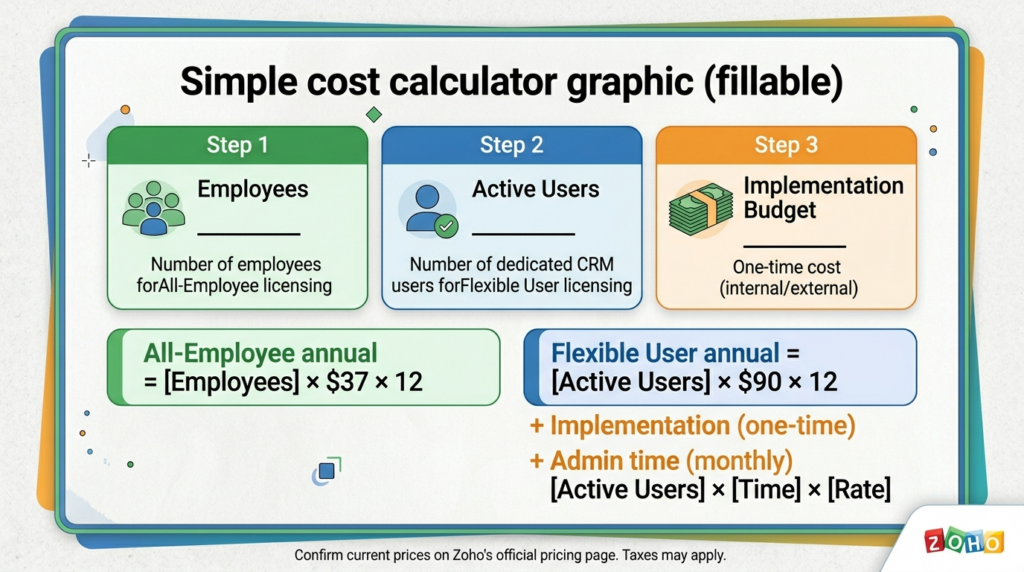
ZOHO ONE COST ESTIMATOR
Zoho One Cost Estimator
Adjust the sliders to compare pricing models for your business.
All-Employee Annual
Best if everyone needs access
Flexible User Annual
Best for specific departments
Quick answer : pricing + the decision rule
Enterprise Licensing Optimizer
Scale your operations across Nairobi with Zoho One.
Optimizing…
Adjust the sliders to find your Tipping Point.
Get an Implementation Quote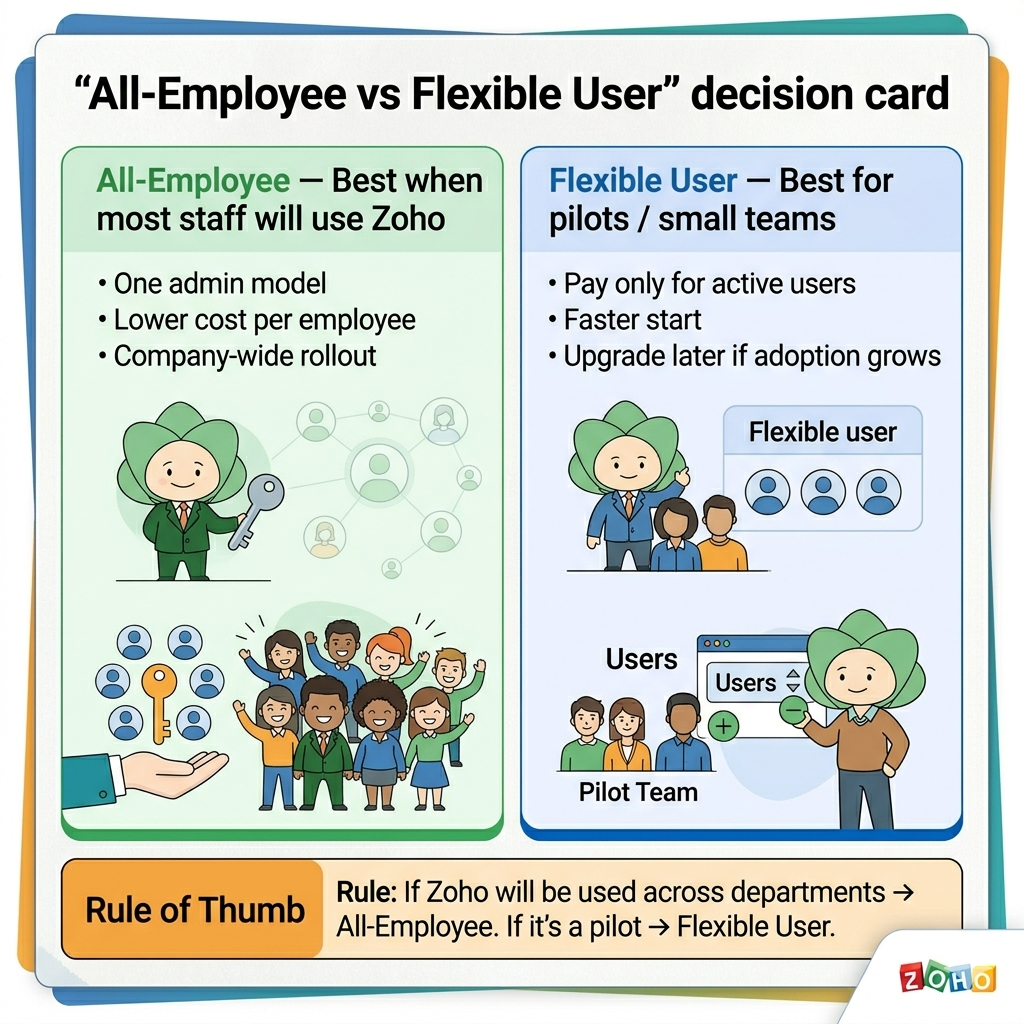
- Zoho One has two main pricing models:All-Employee (you must license everyone) and Flexible User (license only the people who need it).
- Published annual prices (USD): Zoho lists $37/employee/month (All-Employee, billed annually) and $90/user/month (Flexible User, billed annually), plus applicable taxes.
- Rule of thumb: choose All-Employee if you want Zoho used broadly across the company; choose Flexible User if only a small team will use the apps.
- What you’re really buying: not “Office alternatives” only—Zoho One’s value is in running operations (CRM + finance + service + projects + HR) with one admin layer.
- Budget for onboarding: the subscription is only part of total cost—plan time for configuration, migration, and training (or use an implementation partner).
Note: Zoho also lists monthly billing rates on the pricing page. The lowest “per month” numbers most people quote ($37 and $90) are the annual subscription rates.
How we collaborated with a Law Firm Scale Zoho one place (Assessment, Strategy and Implimentation)
A law firm with 25 total staff has a core team of 13—consisting of 6 Intake Specialists, 3 Finance Managers, and 4 Paralegals. They need to connect leads to invoices, but the rest of the staff isn't trained yet. Do you pay for 25 licenses immediately, or start with Flexible Pricing for the core 13 to stabilize the workflows first?
Asentric IT Assessment
- If you want the cheapest correct plan: we used the calculator above, then confirmed whether they are committing to company-wide adoption (All-Employee requirement).
- If you want the fastest rollout: start with Flexible User for the departments that must go live first (Intake/finance/support), then expand.
- If you want the cleanest data + reporting: standardize your processes first (fields, stages, approvals), then configure Zoho One around them.
Asentric IT Verdict: The Path Forward
The Foundation Result (Process-First): Our audit reveals that there current data silos (Leads not talking to Invoices) are a process issue, not just a software one. Result: We will standardize your fields and approvals first, then configure Zoho One to match.
The Velocity Result (Fastest Rollout): Because their Intake and Finance teams are overwhelmed today, we won't wait for a company-wide rollout. Result: We are starting you on the Flexible User plan for these departments to go live in Month 1.
The Efficiency Result (Cheapest Correct Plan): Based on our calculator and your growth plans for 2026, you aren't ready for company-wide adoption yet. Result: We have confirmed that staying on a monthly commitment for specific users is your most cost-effective path until your onboarding plan is ready.
Before you buy here is an Implementation readiness checklist.
- List the 3 workflows you want to fix first: e.g.,
Lead → Quote → Invoice or
Ticket → Resolution; Project kickoff → delivery.
- Decide your system of record: where customer/company data will be mastered (usually Zoho CRM).
- Define roles and permissions: who can view, edit, export, approve.
- Data migration plan: what will be imported, cleaned, and deduplicated (contacts, accounts, deals, invoices).
- Email/domain plan (if using Zoho Mail): DNS changes, SPF/DKIM/DMARC, mailbox migration approach.
- Reporting outcomes: the 5 numbers leadership wants weekly (pipeline, revenue, overdue invoices, ticket backlog, project status).
FAQ's
- Is Zoho One cheaper than buying apps separately?
Usually yes when you need 3+ business apps across multiple functions (CRM + finance + service + projects), because the bundle reduces separate subscriptions.
- Can we start small and scale?
Yes—many teams start with Flexible User (pilot) and move to All-Employee once adoption is proven.
- Do we have to replace Microsoft 365?
Not necessarily. Many businesses keep Microsoft 365 for Office/Teams while using Zoho One for CRM/operations.
Official pricing references (for fact-checking):
Zoho One pricing: zoho.com/one/pricing.
Zoho CRM pricing: zoho.com/crm/zohocrm-pricing.html.